Adding Semantic Search to .NET Apps with `IEmbeddingGenerator`

Have you ever typed "How do I get my money back?" into a search box and gotten zero results, because the docs only ever say "refund policy"? Embeddings fix this! And Microsoft.Extensions.AI makes it easy than ever to do.
This is Part 2 of our Microsoft.Extensions.AI series. In Part 1, we used IChatClient to build an LLM chat bot. This week, we'll use IEmbeddingGenerator to build search that understands meaning, not just keywords!
You're welcome to skip the definitions and jump directly to the code below.
What is an Embedding?
An embedding is just the fancy Linear Alegrbra term for a numerical array (also known as a "vector") that captures the meaning of text.
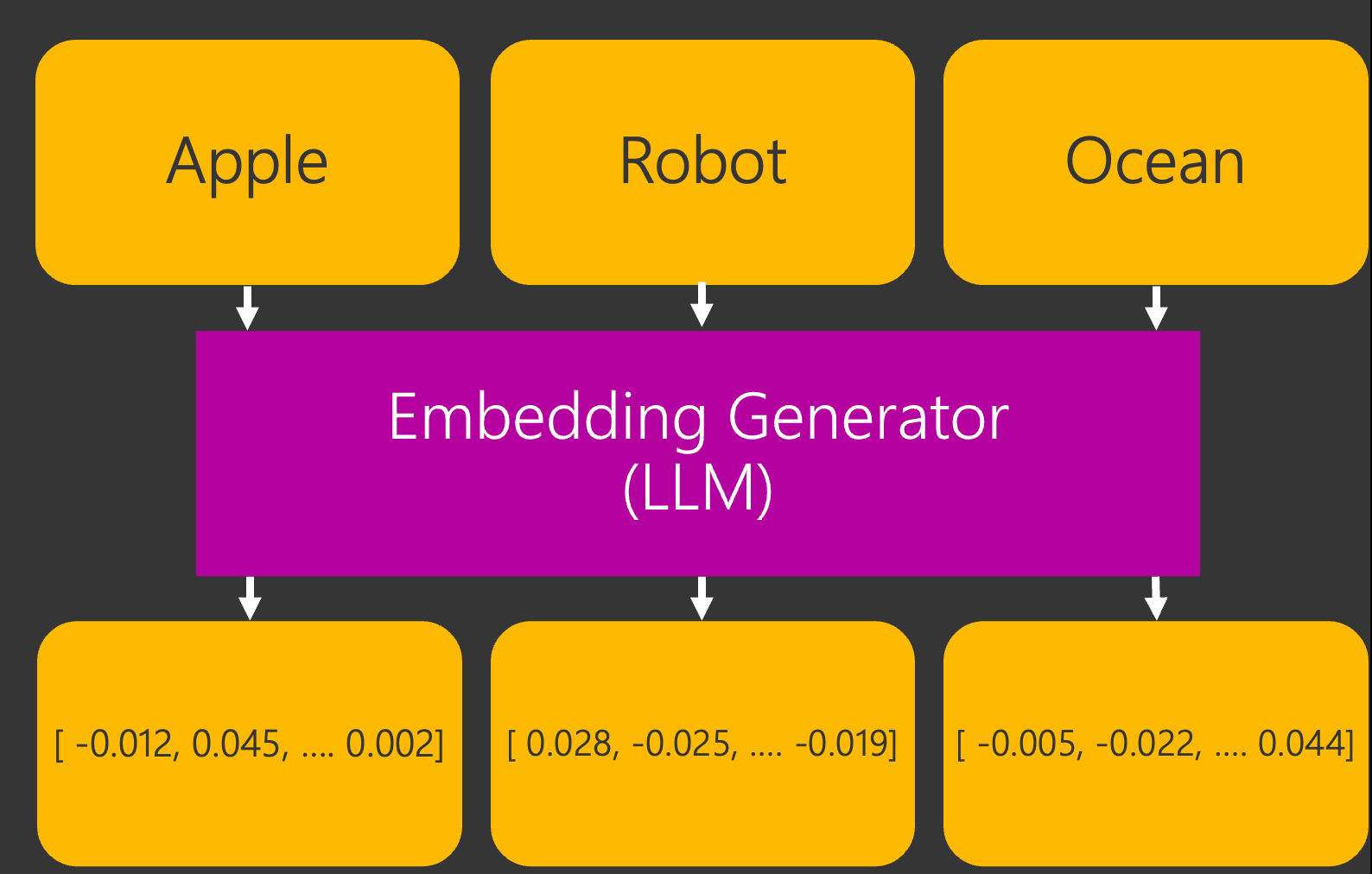
In the above flow diagram, an Embedding Generator creates vectors (numerical arrays) for the the words Apple, Robot and Ocean.
Context also matters when generating embeddings. For example, the word "Apple Computer" generates different embeddings than "Apple Pie".
Comparing these vectors is the entire trick behind semantic search — and it's the foundation of a RAG Pipeline (Retrieval-Augmented Generation), a topic that we'll cover later in this series!
What is IEmbeddingGenerator?
IEmbeddingGenerator<string, Embedding<float>> is the MEAI abstraction for creating embeddings: text goes in, a vector comes out.
Just like IChatClient, it's one interface that every AI provider (OpenAI, Azure, Ollama + more) plugs into, meaning we can swap providers without rewriting our code.
Code
Now that we have those pesky definitions out of the way, let's write some code!
You can find the completed code sample here.
Prerequisites
If you'd like to follow along, here are the steps.
I recommend Ollama because it's completely free. It runs open-source models locally on our machine, so there's no API key and no credit card required.
- Download + install Ollama (if you haven't already)
- Download an embedding model by entering this command in the terminal:
ollama pull qwen3-embedding
Now let's write some code!
Console App
First, let's create a File->New Console app.
- In Visual Studio, create a File -> New Console App
- Add the following NuGet Packages to the Console app:
If you're unfamiliar with adding NuGet Packages, you can find more information here.
Let's embed four documents, then ask a question that shares ZERO keywords with the right answer:
using System.Numerics.Tensors;
using Microsoft.Extensions.AI;
using OllamaSharp;

// OllamaApiClient implements IEmbeddingGenerator, the abstraction provided by Microsoft.Extensions.AI
IEmbeddingGenerator<string, Embedding<float>> generator =
    new OllamaApiClient(new Uri("http://localhost:11434"), "qwen3-embedding");

var documents =
[
    "Our refund policy allows returns within 30 days of purchase.",
    "The espresso machine heats up in under two minutes.",
    "Shipping is free on all orders over fifty dollars.",
    "Reset your password from the account settings page."
];

// Embed every document, keeping each vector paired with its text
var documentEmbeddings =
    await generator.GenerateAndZipAsync(documents);

// Embed the question using the SAME model
ReadOnlyMemory<float> query =
    await generator.GenerateVectorAsync("How do I get my money back?");

// Rank the documents by Cosine Similarity (1.0 = identical meaning)
var rankedEmbeddings = documentEmbeddings
    .Select(static doc => (doc.Value,
                            Similarity: TensorPrimitives.CosineSimilarity(query.Span, doc.Embedding.Vector.Span)))
    .OrderByDescending(static result => result.Similarity);

foreach (var (text, similarity) in rankedEmbeddings)
{
    Console.WriteLine($"{similarity:F3}  {text}");
}
Now let's click Run and see what gets printed to the console:
0.582  Our refund policy allows returns within 30 days of purchase.
0.161  Shipping is free on all orders over fifty dollars.
0.107  Reset your password from the account settings page.
0.084  The espresso machine heats up in under two minutes.
It works! The refund policy has the highest similarity score by a mile, even though our question never mentions the words "refund," "policy" or "returns." The model matched the MEANING! 🎉
Important: Always embed your documents and your query with the same model. Vectors from different embedding models are not comparable to each other.
Conclusion
As .NET developers, we can now add semantic search to our apps with just a handful of lines of code, thanks to IEmbeddingGenerator.
And we've only scratched the surface! MEAI also ships caching middleware for embeddings (so we never pay to embed the same text twice), and pairing embeddings with a Vector Store unlocks full RAG pipelines — both coming later in this series.
You can find the completed code sample here: https://github.com/Dometrain/from-zero-to-hero-microsoft-extensions-ai
Next week, we'll use Microsoft.Extensions.AI to generate images! Make sure to subscribe to this blog so you don't miss it! 👇
To learn even more about Microsoft Extensions AI, check out my course on Dometrain:
 Brandon Minnick
 Dometrain