> ## Content Index
> Fetch the complete content index at: https://codetraveler.io/llms.txt
> Use this file to discover other available public pages before exploring further.
# Supporting Android v12+ Splash Screens in Xamarin.Forms
- URL: https://codetraveler.io/2022/08/16/supporting-android-splash-screens-in-xamarin-forms/
- Published: 2022-08-16T01:56:36.000Z
- Updated: 2022-08-16T03:10:31.000Z
- Description: Android recently changed how splash screens work in Android v12.0 (API Level 31). Let's take a look at how to support it in our Xamarin.Forms apps!
- Author: Brandon Minnick
- Tags: Xamarin, Xamarin.Android, Xamarin.Forms, Splash Screen, Android
If you're an Android user, you may have noticed that, starting with Android v12.0, when you launch an app its Splash Screen now just looks like it's logo. Strange, right? Well that's apparently how Android wants it because that's what they're forcing us to do!
Here's an example of how the splash screen looks in my [open-source Xamarin.Forms app, GitTrends](https://gittrends.com/?ref=codetraveler.io), before and after Android v12.0\. It's a subtle difference (once fixed), but you'll notice the new splash screen now exactly matches the GitTrends icon and is a smaller dpi due to Android's new splash screen restrictions:
| Before Android v12.0 | After Android v12.0 (broken) | After Android v12.0 (Fixed) |
| --------------------------------------------------------------------------------------------------------------------- | -------------------------------------------------------------------------------------------------------------------- | -------------------------------------------------------------------------------------------------------------------- |
|  |  |  |
## Step 0: Target Android API 31+
#### AndroidManifest.xml
In `[AndroidManifest.xml](https://github.com/brminnick/GitTrends/blob/7ba4e4dcecb6c5d1c3089812e01deb22a6ca9c38/GitTrends.Android/Properties/AndroidManifest.xml?ref=codetraveler.io#L3)`, ensure the `android:targetSdkVersion` is `31` or higher (as of publishing this, the current stable release of Android is API Level 32).
Here's an example from [GitTrends' AndroidMainifest.xml](https://github.com/brminnick/GitTrends/blob/7ba4e4dcecb6c5d1c3089812e01deb22a6ca9c38/GitTrends.Android/Properties/AndroidManifest.xml?ref=codetraveler.io#L3):
```xml
```
In the [Android csproj file](https://github.com/brminnick/GitTrends/blob/7ba4e4dcecb6c5d1c3089812e01deb22a6ca9c38/GitTrends.Android/GitTrends.Android.csproj?ref=codetraveler.io#L18), eg `MyApp.Android.csproj`, ensure `TargetFrameworkVersion` is set to `v12.0` or higher (as of publishing this, the current stable release of Android is v12.1).
Here's an example from [GitTrends.Android.csproj](https://github.com/brminnick/GitTrends/blob/7ba4e4dcecb6c5d1c3089812e01deb22a6ca9c38/GitTrends.Android/GitTrends.Android.csproj?ref=codetraveler.io#L18):
```xml
v12.1
```
## Step 1: Create New Images
I know...this is a pain. Android already makes us create multiple images for each screen density (mdpi, hdpi, xhdpi, xxhdpi, xxxhdpi, etc), and we need to do it again for our new Splash Screen icon.
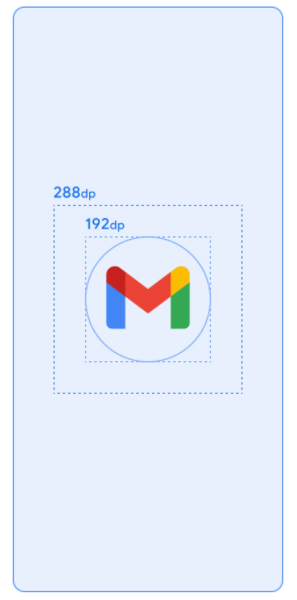
The splash screen icon should match our app's icon and it should reside inside of a 192dp circle centered inside of a 288dp `png` file. These are the steps I followed for [GitTrends](https://gittrends.com/?ref=codetraveler.io):
1. For each display density, create a new `.png` file of your app icon, sized 288dp
- Use [dp to px calculator](http://labs.rampinteractive.co.uk/android%5Fdp%5Fpx%5Fcalculator/?ref=codetraveler.io) to determine the pixel size for each screen density
2. Inside each new file, for each display density, center the app icon inside of a 192dp-radius circle
- Use [dp to px calculator](http://labs.rampinteractive.co.uk/android%5Fdp%5Fpx%5Fcalculator/?ref=codetraveler.io) to determine the pixel size for each screen density
3. Add the new files to the corresponding `drawable` folder, eg `/Resources/drawable-hdpi/`, `/Resources/drawable-xhdpi/`, etc
For my app, [GitTrends](https://gittrends.com/?ref=codetraveler.io), I used the tool [Sketch](https://www.sketch.com/?ref=codetraveler.io) to create my new Splash Screen images. You're welcome to leverage the templates I used in my [Icon.sketch file](https://github.com/brminnick/GitTrends/blob/main/Artwork/Icon.sketch?ref=codetraveler.io): [https://github.com/brminnick/GitTrends/blob/main/Artwork/Icon.sketch](https://github.com/brminnick/GitTrends/blob/main/Artwork/Icon.sketch?ref=codetraveler.io)
## Step 2: Create a new `adaptive-icon`
The new splash screen requires an `adaptive-icon` resource, similar to how we create `[icon.xml](https://github.com/brminnick/GitTrends/blob/main/GitTrends.Android/Resources/mipmap-anydpi-v26/icon.xml?ref=codetraveler.io)` and `[icon-round.xml](https://github.com/brminnick/GitTrends/blob/main/GitTrends.Android/Resources/mipmap-anydpi-v26/icon%5Fround.xml?ref=codetraveler.io)`.
However, the [adaptive-icon API was added in Android API v26](https://developer.android.com/guide/practices/ui%5Fguidelines/icon%5Fdesign%5Fadaptive?ref=codetraveler.io).
To maintain backwards compatibility with previous versions of Android (my [GitTrends](https://gittrends.com/?ref=codetraveler.io) app currently supports Android API Levels 23+), we'll create a `/drawable-v26/` folder for our new splash screen `xml` resource. This tells Android to only include the resource in v26 and up. The rule is that files included in `drawable-vXX` will only be included for devices running Android API Level XX and up.
Here's the steps I followed
1. Create a new folder, `/Resources/drawable-v26/`
2. In `/Resources/drawable-v26/` add a new file, `splashscreenanimatedicon.xml`
3. In `splashscreenanimatedicon.xml`, create a new `adaptive-icon`:
```xml
```
If you're curious, you can find the [completed GitTrends' splashscreenanimatedicon.xml file](https://github.com/brminnick/GitTrends/blob/main/GitTrends.Android/Resources/drawable-v26/SplashScreenAnimatedIcon.xml?ref=codetraveler.io) here: [https://github.com/brminnick/GitTrends/blob/main/GitTrends.Android/Resources/drawable-v26/SplashScreenAnimatedIcon.xml](https://github.com/brminnick/GitTrends/blob/main/GitTrends.Android/Resources/drawable-v26/SplashScreenAnimatedIcon.xml?ref=codetraveler.io)
## Step 3: Update `styles.xml`
#### Splash Screen Style, Before Android v12.0
In the file `/Resouces/values/styles.xml`, you likely have defined a custom splash screen for your app that looks something like this:
```xml
```
The `android:windowBackground` value points to my original splash screen, `splash_screen.xml` which I created using a `layer-list`. For example, here's what my original splash screen, `splash_screen.xml`, looked like before Android v12.0:
```xml
-
```
#### Splash Screen Style, After Android v12.0
For Android v12.0+, we need to add two values to our Splash Screen Theme in `styles.xml`:
- `android:windowSplashScreenBackground`
- The background color of your splash screen
- `android:windowSplashScreenAnimatedIcon`
- The `adaptive-icon` xml file we created above in Step 2
Here's the final final result from my [GitTrends](https://gittrends.com/?ref=codetraveler.io) app:
```xml
```
The best news is that we can keep the values for our previous splash screen, e.g. `android:windowBackground`, along side the new values for our Android API Level 30+ splash screen, `android:windowSplashScreenAnimatedIcon` and `android:windowSplashScreenBackground`!
When the app runs on Android API Level 31+, it checks the Launch Theme for two values:
- [android:windowSplashScreenBackground](https://github.com/brminnick/GitTrends/blob/438d8b7854bb1e9cab31e05f18d5bbdf6b198a3c/GitTrends.Android/Resources/values/styles.xml?ref=codetraveler.io#L30)
- [android:windowSplashScreenAnimatedIcon](https://github.com/brminnick/GitTrends/blob/438d8b7854bb1e9cab31e05f18d5bbdf6b198a3c/GitTrends.Android/Resources/values/styles.xml?ref=codetraveler.io#L31)
Android uses these two values for the Splash Screen and ignores the other values in the `style`.
When the app runs on Android API Level 30 (and below), it doesn't know about the new APIs added in v31, so when it sees `android:windowSplashScreenAnimatedIcon` and `android:windowSplashScreenBackground`, it ignores these values.
Android just checks the Launch Theme for [android:windowBackground](https://github.com/brminnick/GitTrends/blob/438d8b7854bb1e9cab31e05f18d5bbdf6b198a3c/GitTrends.Android/Resources/values/styles.xml?ref=codetraveler.io#L28), which still points to my original launch screen, [splash\_screen.xml](https://github.com/brminnick/GitTrends/blob/main/GitTrends.Android/Resources/drawable/splash%5Fscreen.xml?ref=codetraveler.io), which uses a `layer-list`.
## Step 4: Set The Launch Theme
Now that we've updated our splash screen theme, we need to ensure Android knows that we want to use it when the app launches.
In Xamarin.Android, this may be set in multilple different places:
- MainActivity.cs
- AndroidManifest.xml
- MainApplication.cs
#### MainActivity.cs
In `MainActivity.cs`, the launch theme can be set using the `[Activity]` attribute, eg `[Activity(MainTheme = "@style/MainTheme")]`.
In your code, open `MainActivity.cs` and check to see if your MainActivity is using the `[Activity]` attribute (most Xamarin.Forms apps do, but some don't and that's ok).
If the `[Activity]` attribute is being used, ensure that its `MainTheme` property references the name of your launch theme.
For example, in [MainActivity.cs for GitTrends](https://github.com/brminnick/GitTrends/blob/7ba4e4dcecb6c5d1c3089812e01deb22a6ca9c38/GitTrends.Android/MainActivity.cs?ref=codetraveler.io#L17), I used `[Activity(MainTheme = "@style/LaunchTheme")]` because I named the[ launch theme for my ](https://github.com/brminnick/GitTrends/blob/7ba4e4dcecb6c5d1c3089812e01deb22a6ca9c38/GitTrends.Android/Resources/values/styles.xml?ref=codetraveler.io#L27)[GitTrends app](https://gittrends.com/?ref=codetraveler.io) `LaunchTheme`:
```xml
```
#### AndroidManifest.xml
In `AndroidManifest.xml`, the launch theme can be set in the `` tag, eg ``.
In your code, open `AndroidManifest.xml` and check to see if your Android Manifest is using the `android:theme` value inside of the `` tag (some Xamarin.Forms apps do, but some don't and that's ok).
If the `android:theme` value is set, ensure that its `MainTheme` property references the name of your launch theme.
For example, I named the[ launch theme for my ](https://github.com/brminnick/GitTrends/blob/7ba4e4dcecb6c5d1c3089812e01deb22a6ca9c38/GitTrends.Android/Resources/values/styles.xml?ref=codetraveler.io#L27)[GitTrends app](https://gittrends.com/?ref=codetraveler.io) `LaunchTheme`, so I would thus use `` in my `AndroidManifest` (I personally don't because I already defined the launch theme in my `MainActivity`).
#### MainApplication
In `MainApplication.cs`, the launch theme can be set using the `[Application]` attribute, eg `[Application(MainTheme = "@style/MainTheme")]`.
In your code, open `MainActivity.cs` and check to see if your MainActivity is using the `[Application]` attribute (most Xamarin.Forms apps do, but some don't and that's ok).
If the `[Application]` attribute is being used, ensure that its `MainTheme` property references the name of your launch theme.
For example, I named the[ launch theme for my ](https://github.com/brminnick/GitTrends/blob/7ba4e4dcecb6c5d1c3089812e01deb22a6ca9c38/GitTrends.Android/Resources/values/styles.xml?ref=codetraveler.io#L27)[](https://gittrends.com/?ref=codetraveler.io)[GitTrends app](https://github.com/brminnick/GitTrends/blob/7ba4e4dcecb6c5d1c3089812e01deb22a6ca9c38/GitTrends.Android/Resources/values/styles.xml?ref=codetraveler.io#L27)[ ](https://github.com/brminnick/GitTrends/blob/7ba4e4dcecb6c5d1c3089812e01deb22a6ca9c38/GitTrends.Android/Resources/values/styles.xml?ref=codetraveler.io#L27)`[LaunchTheme](https://github.com/brminnick/GitTrends/blob/7ba4e4dcecb6c5d1c3089812e01deb22a6ca9c38/GitTrends.Android/Resources/values/styles.xml?ref=codetraveler.io#L27)`, so I would thus use `` in my `MainApplication` (I personally don't because I already defined the launch theme in my `MainActivity`).
## Conclusion
Now we have a working Splash Screen on Andorid (again)!
This new splash screen format actually opens the door for us to explore really cool animated splash screens. For example check out the below splash screens by [](https://www.raywenderlich.com/u/jemmsla?ref=codetraveler.io)[J](https://www.raywenderlich.com/32555180-splash-screen-tutorial-for-android?ref=codetraveler.io)emma Slater.
If you're interested in learning more about how to continue to improve your new Android v12.0 splash screen, I highly recommend the following tutorials:
- ["Splash Screen Tutorial for Android" by Jemma Slater ](https://www.raywenderlich.com/32555180-splash-screen-tutorial-for-android?ref=codetraveler.io)
- ["Splash screens" by Google](https://developer.android.com/guide/topics/ui/splash-screen?ref=codetraveler.io)
| Icon Background Color | Branding Image (bottom image) | Animated Splash Screen |
| ----------------------------------------------------------------------------------------------------- | ---------------------------------------------------------------------------------------------- | ---------------------------------------------------------------------------------------------- |
|  |  |  |