> ## Content Index
> Fetch the complete content index at: https://codetraveler.io/llms.txt
> Use this file to discover other available public pages before exploring further.
# Creating Azure Functions using .NET 5
- URL: https://codetraveler.io/2021/05/28/creating-azure-functions-using-net-5/
- Published: 2021-05-28T17:35:00.000Z
- Updated: 2021-06-15T23:26:52.000Z
- Description: Azure Functions recently released support for .NET 5. Let's take a look at how to upgrade our existing Azure Functions to use it!
- Author: Brandon Minnick
- Tags: azure functions, azure, Xamarin, .NET, .NET 5, .NET Core, API, Timer
**Updated Fri 28 May 2021**
Azure Functions [recently released support for .NET 5](https://docs.microsoft.com/en-us/azure/azure-functions/dotnet-isolated-process-developer-howtos?tabs=browser&pivots=development-environment-vs&WT.mc%5Fid=dotnet-13135-bramin&ref=codetraveler.io). Let's take a look at how to upgrade our existing Azure Functions to use it!
### Why is upgrading to .NET 5 more complicated than last time?
You might be wondering "Why can't I just change `netcoreapp3.1` to `net5.0` and be done?"
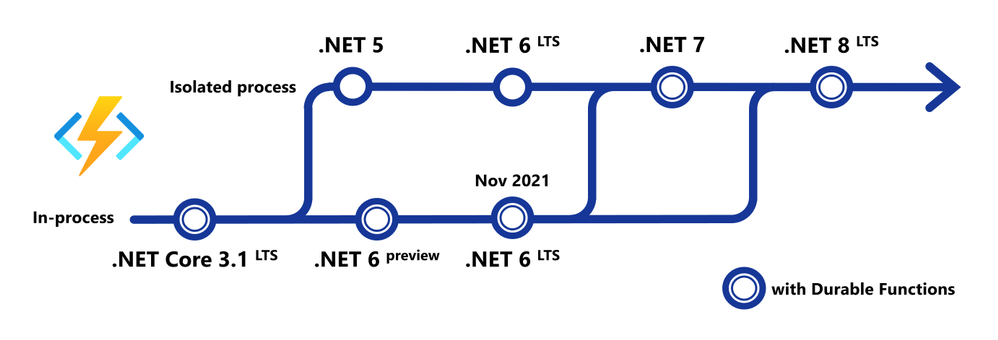
Historically, our Azure Functions' code has always been tightly coupled with the .NET verson of the [Azure Functions](https://docs.microsoft.com/azure/azure-functions/create-first-function-vs-code-csharp?WT.mc%5Fid=dotnet-13135-bramin&ref=codetraveler.io)' Runtime, specifically Long Term Support (LTS) .NET releases. This meant that we couldn't write our code using a newer version of .NET until the Azure Functions team also updated their Azure Functions .NET Runtime.
This is the first release that moves our .NET code to an "[Isolated Process model](https://techcommunity.microsoft.com/t5/apps-on-azure/net-5-support-on-azure-functions/ba-p/1973055?WT.mc%5Fid=dotnet-13135-bramin&ref=codetraveler.io)" (aka `dotnet-isolated`), allowing us to write our Azure Functions' code using any version of .NET!
# Walkthrough
In this walkthrough, I'll be providing snippets from the Azure Functions I use for my app [GitTrends](https://gittrends.com/?ref=codetraveler.io).
GitTrends is an open-source app available in the [iOS](https://apps.apple.com/app/gittrends-github-insights/id1500300399?ref=codetraveler.io) and [Android](https://play.google.com/store/apps/details?id=com.minnick.gittrends&ref=codetraveler.io) App Stores, built in C# using Xamarin, that uses Azure Functions for its backend.
You can find the completed solution in the GitTrends repository, here: [https://github.com/brminnick/GitTrends/tree/main/GitTrends.Functions](https://github.com/brminnick/GitTrends/tree/main/GitTrends.Functions?ref=codetraveler.io)
## 1\. Update .NET
Let's update to .NET 5!
First, [download the .NET 5 SDK](https://dotnet.microsoft.com/download/dotnet/5.0?WT.mc%5Fid=dotnet-13135-bramin&ref=codetraveler.io) and install it on your development machine.
Then, in your Functions' CSPROJ, set the following values for `TargetFramework`, `AzureFunctionsVersion`, `OutputType` and `_FunctionsSkipCleanOutput`:
([Here is a completed working example](https://github.com/brminnick/GitTrends/blob/bae0c4c414e15badd035ce5fe2195940d02d0bd7/GitTrends.Functions/GitTrends.Functions.csproj?ref=codetraveler.io#L3-L8))
```xml
net5.0
v3
Exe
<_FunctionsSkipCleanOutput>true
```
## 2\. Update NuGet Packages
Now let's add the necessary NuGet Packages.
In your Functions' CSPROJ, ensure the following `PackageReference`s have been added:
([Here is a completed example](https://github.com/brminnick/GitTrends/blob/bae0c4c414e15badd035ce5fe2195940d02d0bd7/GitTrends.Functions/GitTrends.Functions.csproj?ref=codetraveler.io#L9-L24))
> **Note**: For `Microsoft.Azure.Functions.Worker.Sdk`, add `OutputItemType="Analyzer"`
```xml
```
## 3\. Update local.settings.json
To run our Functions locally, we'll need to tell the Azure Functions Host to use the isolated dotnet runtime in `local.settings.json` by by setting `FUNCTIONS_WORKER_RUNTIME` to `dotnet-isolated`, like so:
([Here is a working completed example](https://github.com/brminnick/GitTrends/blob/bae0c4c414e15badd035ce5fe2195940d02d0bd7/GitTrends.Functions/local.settings.json?ref=codetraveler.io#L4-L5))
```json
{
"IsEncrypted": false,
"Values": {
"FUNCTIONS_WORKER_RUNTIME": "dotnet-isolated",
"AzureWebJobsStorage": "UseDevelopmentStorage=true",
}
}
```
Then, in the Functions' CSPROJ, ensure it is being copied to the output directory using `CopyToOutputDirectory` like so:
([Here is a working completed example](https://github.com/brminnick/GitTrends/blob/bae0c4c414e15badd035ce5fe2195940d02d0bd7/GitTrends.Functions/GitTrends.Functions.csproj?ref=codetraveler.io#L29-L32))
```xml
PreserveNewest
```
## 4\. Update Initialization & Dependency Injection
The way we initialize Azure Functions, including Dependency Injection, for .NET 5 has improved.
### Old Initialization & Dependency Injection (pre .NET 5.0)
The old way to use [Dependency Injection with Azure Functions](https://docs.microsoft.com/azure/azure-functions/functions-dotnet-dependency-injection?WT.mc%5Fid=dotnet-13135-bramin&ref=codetraveler.io) was to add the `[assembly: FunctionsStartup]` attribute and inherit from `FunctionsStartup`.
Here is an example of how we *used to* initialize Dependency Injection in Azure Functions:
([Here is a completed working example](https://github.com/brminnick/GitTrends/blob/12b18d54373106cd13c0b0a523740afcf15a2fde/GitTrends.Functions/Startup.cs?ref=codetraveler.io#L15-L57))
```csharp
//Note: This is the old (pre-.NET 5) way of using Dependency Injection with Azure Functions
[assembly: FunctionsStartup(typeof(Startup))]
namespace GitTrends.Functions
{
public class Startup : FunctionsStartup
{
readonly static string _storageConnectionString = Environment.GetEnvironmentVariable("AzureWebJobsStorage") ?? string.Empty;
public override void Configure(IFunctionsHostBuilder builder)
{
builder.Services.AddHttpClient();();
builder.Services.AddSingleton();
builder.Services.AddSingleton(CloudStorageAccount.Parse(_storageConnectionString).CreateCloudBlobClient());
}
}
}
//Note: This is the old (pre-.NET 5) way of using Dependency Injection with Azure Functions
```
### New Initialization & Dependency Injection
The new way is to initialize Azure Functions in .NET 5 is more similar to ASP.NET. It uses to `Microsoft.Extensions.Hosting.HostBuilder`, like so:
([Here is a competed working example](https://github.com/brminnick/GitTrends/blob/bae0c4c414e15badd035ce5fe2195940d02d0bd7/GitTrends.Functions/Program.cs?ref=codetraveler.io#L18-L67))
```csharp
namespace GitTrends.Functions
{
class Program
{
readonly static string _storageConnectionString = Environment.GetEnvironmentVariable("AzureWebJobsStorage") ?? string.Empty;
static Task Main(string[] args)
{
var host = new HostBuilder()
.ConfigureAppConfiguration(configurationBuilder =>
{
configurationBuilder.AddCommandLine(args);
})
.ConfigureFunctionsWorkerDefaults()
.ConfigureServices(services =>
{
// Add Logging
services.AddLogging();
// Add HttpClient
services.AddHttpClient();
// Add Custom Services
services.AddSingleton();
services.AddSingleton(CloudStorageAccount.Parse(_storageConnectionString).CreateCloudBlobClient());
})
.Build();
return host.RunAsync();
}
}
}
```
## 5\. Update HttpTrigger Functions
To update an existing `HttpTrigger` Function, we replace the following method parameters:
- `FunctionName` \-> `Function`
- `HttpRequest` \-> `HttpRequestData`
- `IActionResult` \-> `HttpResponseData`
- `ILogger` \-> `FunctionContext`
> **Note**: `ILogger` can now be found in `FunctionContex.GetLogger()`
### Old HttpTrigger (pre .NET 5.0)
Here is an example of the old (pre .NET 5) way of creating an `HttpTrigger`:
([Here is a completed working example](https://github.com/brminnick/GitTrends/blob/12b18d54373106cd13c0b0a523740afcf15a2fde/GitTrends.Functions/Functions/GetGitHubClientId.cs?ref=codetraveler.io#L11-L25))
```csharp
//Note: This is the old (pre-.NET 5) way of creating an HttpTrigger with Azure Functions
public static class GetGitHubClientId
{
readonly static string _clientId = Environment.GetEnvironmentVariable("GitTrendsClientId") ?? string.Empty;
[FunctionName(nameof(GetGitHubClientId))]
public static IActionResult Run([HttpTrigger(AuthorizationLevel.Anonymous, "get")] HttpRequest request, ILogger log)
{
log.LogInformation("Retrieving Client Id");
if (string.IsNullOrWhiteSpace(_clientId))
return new NotFoundObjectResult("Client ID Not Found");
return new OkObjectResult(new GetGitHubClientIdDTO(_clientId));
}
}
//Note: This is the old (pre-.NET 5) way of creating an HttpTrigger with Azure Functions
```
### New HttpTrigger
The new `HttpTrigger` syntax is *nearly* identical; only `Function` is used as the method assembly attribute, and both `HttpRequestData` and `FunctionContext` are now being used as its method parameters, and `HttpResponseData` is used as the return type:
([Here is a completed working example](https://github.com/brminnick/GitTrends/blob/cec71347be100d5d1ab4a3c5b8fd2a5ca0bdf906/GitTrends.Functions/Functions/GetGitHubClientId.cs?ref=codetraveler.io#L12-L27))
```csharp
public static class GetGitHubClientId
{
readonly static string _clientId = Environment.GetEnvironmentVariable("GitTrendsClientId") ?? string.Empty;
[Function(nameof(GetGitHubClientId))]
public static async Task Run([HttpTrigger(AuthorizationLevel.Anonymous, "get")] HttpRequestData req, FunctionContext context)
{
var logger = context.GetLogger(nameof(GetGitHubClientId));
logger.LogInformation("Retrieving Client Id");
if (string.IsNullOrWhiteSpace(_clientId))
{
var notFoundResponse = req.CreateResponse(System.Net.HttpStatusCode.NotFound);
await notFoundResponse.WriteStringAsync("Client ID Not Found").ConfigureAwait(false);
return notFoundResponse;
}
var okResponse = req.CreateResponse(System.Net.HttpStatusCode.OK);
await okResponse.WriteAsJsonAsync(new GetGitHubClientIdDTO(_clientId));
return okResponse;
}
}
```
## 6\. Update TimerTrigger Functions
To update an existing `TimerTrigger` Function, we must do the following:
- `FunctionName` \-> `Function`
- `ILogger` \-> `FunctionContext`
> **Note**: `ILogger` can now be found in `FunctionContex.GetLogger()`
### Old TimerTrigger (pre .NET 5.0)
Here is an example of a `TimerTrigger` Function before updating it to .NET 5.0:
([Here is a working completed example](https://github.com/brminnick/GitTrends/blob/12b18d54373106cd13c0b0a523740afcf15a2fde/GitTrends.Functions/Functions/SendSilentPushNotification.cs?ref=codetraveler.io#L24-L25))
```csharp
//Note: This is the old (pre-.NET 5) way of creating an TimerTrigger with Azure Functions
public class SendSilentPushNotification
{
const string _runEveryHourCron = "0 0 * * * *";
readonly static string _notificationHubFullConnectionString = Environment.GetEnvironmentVariable("NotificationHubFullConnectionString") ?? string.Empty;
readonly static Lazy _clientHolder = new(NotificationHubClient.CreateClientFromConnectionString(_notificationHubFullConnectionString, GetNotificationHubInformation.NotificationHubName));
static NotificationHubClient Client => _clientHolder.Value;
[FunctionName(nameof(SendSilentPushNotification))]
public static Task Run([TimerTrigger(_runEveryHourCron)] TimerInfo myTimer, ILogger log) => Task.WhenAll(TrySendAppleSilentNotification(Client, log), TrySendFcmSilentNotification(Client, log));
}
//Note: This is the old (pre-.NET 5) way of creating an TimerTrigger with Azure Functions
```
### New TimerTrigger
In the new `TimerTrigger`, `Function` is used for its assembly attribute, and, in the its method parameters, we remove `ILogger`, replacing it with `FunctionContext`:
([Here is a working completed example](https://github.com/brminnick/GitTrends/blob/cec71347be100d5d1ab4a3c5b8fd2a5ca0bdf906/GitTrends.Functions/Functions/SendSilentPushNotification.cs?ref=codetraveler.io#L25-L31))
```csharp
public class SendSilentPushNotification
{
const string _runEveryHourCron = "0 0 * * * *";
readonly static string _notificationHubFullConnectionString = Environment.GetEnvironmentVariable("NotificationHubFullConnectionString") ?? string.Empty;
readonly static Lazy _clientHolder = new(NotificationHubClient.CreateClientFromConnectionString(_notificationHubFullConnectionString, GetNotificationHubInformation.NotificationHubName));
static NotificationHubClient Client => _clientHolder.Value;
[Function(nameof(SendSilentPushNotification))]
public static Task Run([TimerTrigger(_runEveryHourCron)] TimerInfo myTimer, FunctionContext context)
{
var logger = context.GetLogger(nameof(SendSilentPushNotification));
return Task.WhenAll(TrySendAppleSilentNotification(Client, logger), TrySendFcmSilentNotification(Client, logger));
}
}
```
## 7\. Run .NET 5 Azure Functions Locally
> **Note**: Visual Studio v16.11 is also able to build, debug & run `dotnet-isolated` functions locally. For simplicity, this walkthrough uses the Azure Functions CLI.
0\. Install [Azure Functions Core Tools v3.0.3160](https://github.com/Azure/azure-functions-core-tools?ref=codetraveler.io)
- On macOS: Open the [Terminal](https://macpaw.com/how-to/use-terminal-on-mac?ref=codetraveler.io) and run the following command: `brew tap azure/functions; brew install azure-functions-core-tools@3`
- On Windows: Open the [Command Prompt](https://www.howtogeek.com/235101/10-ways-to-open-the-command-prompt-in-windows-10/?ref=codetraveler.io) and run the following command: `npm i -g azure-functions-core-tools@3 --unsafe-perm true`
1. On the command line, navigate to the folder containing your Azure Functions CSPROJ
2. On the command line, enter the following command: `func start --verbose`
> **Note:** More details on using the Azure Functions CLI can be [found here](https://docs.microsoft.com/en-us/azure/azure-functions/dotnet-isolated-process-developer-howtos?pivots=development-environment-cli&tabs=browser&WT.mc%5Fid=dotnet-13135-bramin&ref=codetraveler.io)
## 8\. Publish .NET 5 Azure Functions to Azure
> **Note**: Visual Studio v16.11 is also able to deploy `dotnet-isolated` functions to Azure. For simplicity, this walkthrough uses the Azure Functions CLI.
0\. Install [Azure Functions Core Tools v3.0.3160](https://github.com/Azure/azure-functions-core-tools?ref=codetraveler.io)
- On macOS: Open the [Terminal](https://macpaw.com/how-to/use-terminal-on-mac?ref=codetraveler.io) and run the following command: `brew tap azure/functions; brew install azure-functions-core-tools@3`
- On Windows: Open the [Command Prompt](https://www.howtogeek.com/235101/10-ways-to-open-the-command-prompt-in-windows-10/?ref=codetraveler.io) and run the following command: `npm i -g azure-functions-core-tools@3 --unsafe-perm true`
1. On the command line, navigate to the folder containing your Azure Functions CSPROJ
2. On the command line, enter the following command: `func azure functionapp publish `
> **Note:** More details on using the Azure Functions CLI can be [found here](https://docs.microsoft.com/en-us/azure/azure-functions/dotnet-isolated-process-developer-howtos?pivots=development-environment-cli&tabs=browser&WT.mc%5Fid=dotnet-13135-bramin&ref=codetraveler.io)
# Conclusion
The Azure Functions team is doing a ton of work to create Isolated Process workers that allow us to use any version of .NET for our Azure Functions' Code.
Going forward, this Isolated Process model will be the recommended way to write code for Azure Functions, and you can read more about it here: [https://techcommunity.microsoft.com/t5/apps-on-azure/net-on-azure-functions-roadmap/ba-p/2197916](https://techcommunity.microsoft.com/t5/apps-on-azure/net-on-azure-functions-roadmap/ba-p/2197916?WT.mc%5Fid=dotnet-13135-bramin&ref=codetraveler.io).